
Document Manager vs SharePoint
Document Manager and SharePoint
These notes have been compiled to answer questions about the differences
between Document Manager and Microsoft SharePoint.
Compare SharePoint’s document management attributes.
In a document management system, you will tag your documents according to their critical information to find what you need quickly without knowing where or how files are organised. By comparison, SharePoint encourages document sharing and does not have the built-in functionality to track records.
Core Document Management System and SharePoint Functions Compared
Document Manager:
- A pure-play, cradle-to-grave, centralised document management workflow solution
- Focuses on departmental and company-wide administrative efficiency
- Upgrades and support are included in the purchase/license
- Designed and deployed to accomplish specific business tasks
- Straightforward, relatively fast implementation
SharePoint:
- A highly reputable bundled Microsoft document storage and sharing platform
- Limited extended business functionality built-in
- Potential to develop to achieve highly complex business functions at a significant cost and over an extended period of time
- Requires expert in-house or third-party maintenance
- A powerful developers’ platform beyond its core purpose implicit in its name “Share”
Summary of Document Management and SharePoint Capabilities
Document Manager is a specialised product for document management workflows with a focus on administrative efficiency.
SharePoint is a versatile platform with document storage and sharing capabilities that can be extended to support complex business functions but requires significant development effort and maintenance expertise.

SharePoint Implementation Considerations vs DMS
SharePoint is a platform, not a product. The most successful SharePoint systems have a lot of custom development behind them. SharePoint has some characteristics that organisations should consider:
- Complexity
SharePoint can be complex to set up and configure, especially for organisations with limited IT resources or expertise. - Customisation challenges
While SharePoint offers extensive customisation capabilities, implementing custom solutions often requires specialised skills in ASP.NET. Additionally, plug-in additions can break customisations and lead to maintenance challenges. - User adoption
SharePoint’s user interface and functionality can be overwhelming for some users, and extensive training may be required. - Document management limitations
While SharePoint is designed for document storage and sharing, some users find its document management features weak compared to dedicated document management solutions. Poor search functionality and permissions management are common complaints - Version control issues
SharePoint’s version control system may not meet the needs of all organisations, especially those with strict compliance requirements. No strict check-out/check-in functionality. - Maintenance overhead
SharePoint typically requires at least one dedicated in-house administrator to manage and maintain the platform. Updates and patches may need to be applied regularly. - Cost
While SharePoint is included in Microsoft 365 subscriptions, additional licensing may be required for extended functionality. Custom development and maintenance costs can contribute to the overall expense of a SharePoint deployment. - Integration challenges
Integrating SharePoint with other business systems or applications may require additional development effort and expertise
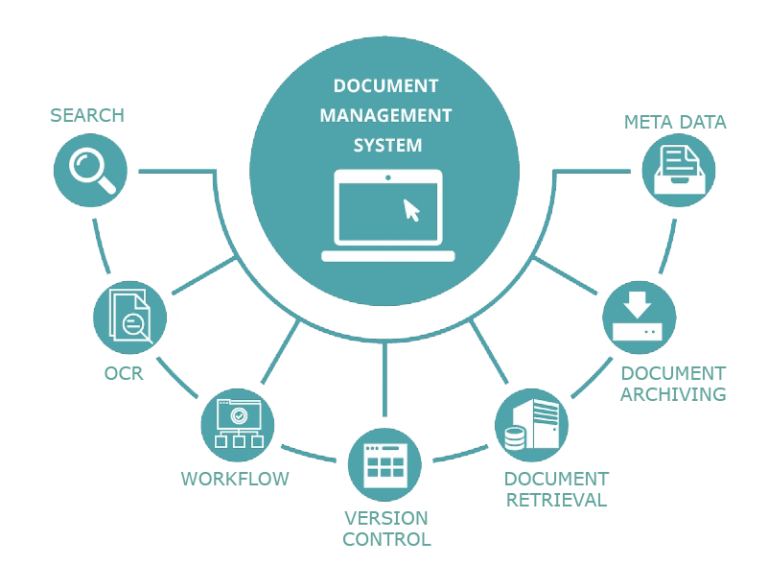
Document Manager vs SharePoint comparisons
Innate document management system characteristics
- Document capture from multiple sources
- Batch (bulk) capture, capability for page separation
- Indexing and central document storage
- Workflow automation
- Customisable user dashboards, pinned searches and prompts
- Multiple document views, including thumbnails
- Built-in rules, embedded conventions and policies
- Search and retrieval by criteria, including metadata
- Check-in Check-out version control
- Document level control, permissions
- Time-stamped activity, robust audit trails for QA and compliance
- Retention and purge automation
- GDPR and industry regulatory compliance functions (including: permissions, retention and redaction)
- Integrates with leading business platforms: SAP, Sage, Microsoft 365/Office, HR systems, Google docs
- BI and Advanced reporting
- Works for individual departments and cross-departmentally
- Leverage DM IP, dedicated dev/install/support teams, and progressive roadmap
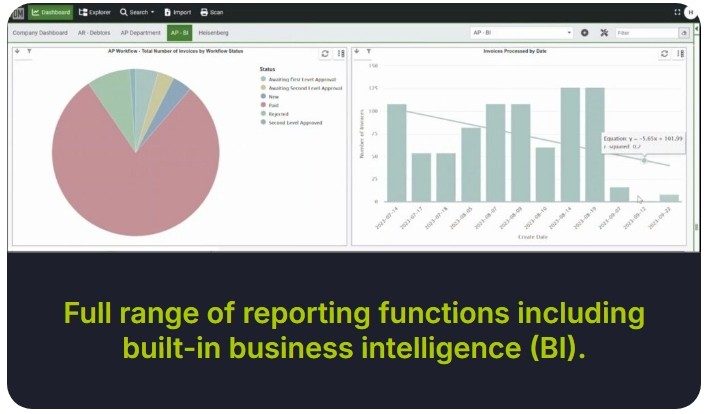
Demonstration of Document Manager vs SharePoint capabilities
A checklist of Document Manager and SharePoint capabilities, their core functions, built-in capabilities and user-friendliness only goes so far in helping potential users evaluate their options.
SharePoint has its attractions as a basic, bundled platform, and the same can be said of SaaS and lightweight document management systems. A major difference becomes apparent when it is intended to implement SharePoint or a document management system as business process management workflow solution.
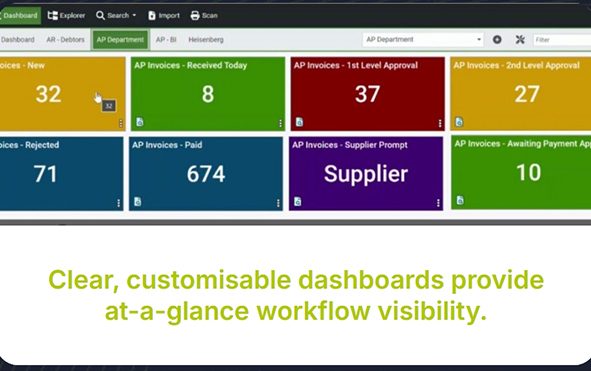
Workflow solutions must necessarily have sophisticated dashboard views, permission-based access, version control, approvals, compliance and reporting functions. Yet these same functions must be simple to use, manage and customise, to ensure user adoption and continued user satisfaction.
Document Manager, therefore, has an at-a-glance dashboard with a view of outstanding and completed tasks, which operates with pinned searches and provides the capability to annotate and approve single-version-of-the-truth documents.
SharePoint is a great document management tool, but it is likely to require a lot of work to maintain, especially for large and growing companies. Organisations will be able use SharePoint effectively for a while by setting up an intuitive site structure and maintaining clear, logical content governance guidelines, but it is unlikely to meet the needs of the business over an extended period of time.

Check Out the Latest Digital Document Management Advances
Book a call with Officentria to arrange a demo of the latest advances in document management. We’ll explain how automated document management today encompasses the complete life cycle of documents from ingestion to compliant retention and purge, with all the necessary collaborative steps in between.
We work across all industries and with every type of department around the world.
If you are contemplating implementing SharePoint or a document and records management system, take advantage of thirty years of experience in business process management to compare SharePoint attributes and decide which solution suits your needs today and in the future.
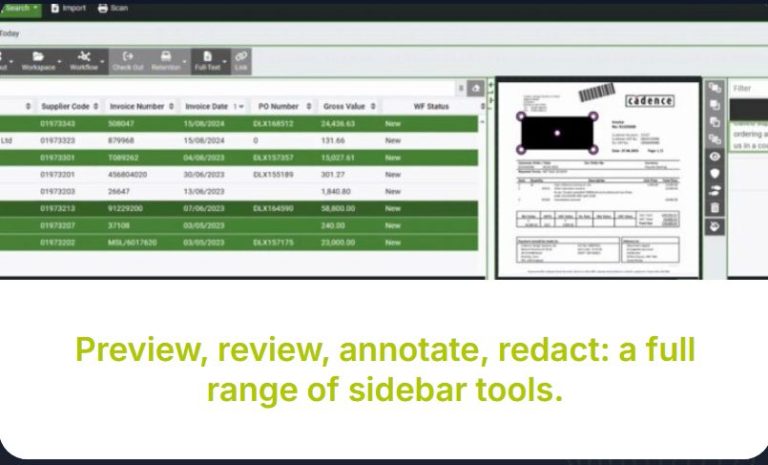
Conclusion: SharePoint Document Management Limitations
What are the issues with SharePoint? Why isn’t it the ideal document management system (DMS) for a growing business?
What Can SharePoint Offer?
If your business has the time, budget and IT resources, SharePoint can be customised to serve various functions. With some patience and the help of a consultant, you can transform SharePoint into a secure document-sharing platform that you can update and maintain. However, the real question is, why would you choose to go through all that effort?
If your business is growing in an agile manner, you need a DMS that is just as flexible and responsive. SharePoint can take considerable work to become the document management system you envision, and it comes with several challenges that you need to be aware of.
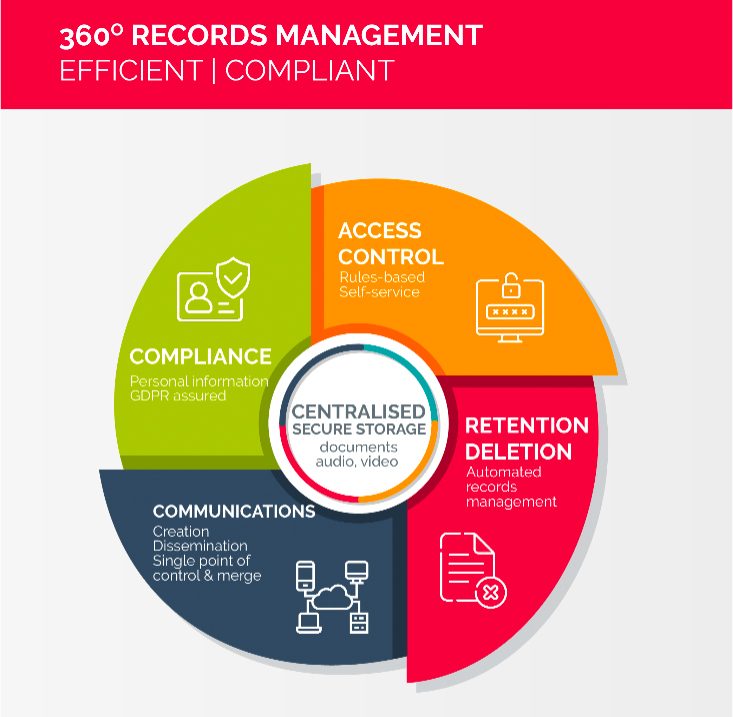
What Are Your Document Management Needs?
Many businesses believe their document management needs are unique and try to use SharePoint to create a tailored solution. However, the truth is that proprietary DMS solutions are usually more readily customisable than SharePoint.
Some DMS systems are even designed specifically for certain industries, which means they may already include the features your business requires. For example, businesses in regulated sectors such as medical device manufacturing may benefit from a DMS built to handle the complexities of ISO 13485 certification or FDA 21 CFR Part 11 compliance.
Specialised DMS solutions help businesses in niche sectors adapt quickly to regulatory demands with their product development, business processes and quality management tools.
What are SharePoint’s Limitations?
When considering a document management system, it’s crucial to evaluate how well it supports your specific needs. SharePoint has its limitations, which often become apparent only during everyday use.
Questions to Consider Before Choosing SharePoint as Your Document Management System:
- Can you enforce effective document controls?
SharePoint’s basic document management functions are limited. Features like automatic versioning and audit trails are not available by default, and you may need to rely on third-party plugins for essential features like e-signatures, which adds ongoing costs. - Can you find documents easily?
SharePoint’s search functionality has been a longstanding issue. Even with recent improvements, users often find the search process unreliable and difficult to refine. For a DMS to be effective, documents must be quick and easy to find, to ensure that workers and auditors can access information efficiently. - Does SharePoint Support Critical Business Processes?
SharePoint lacks robust features like automatic versioning and controls for managing document drafts versus final versions. Lack of versioning controls can pose a problem when you need to be certain that decisions are based on the correct document versions and up-to-date information. - Is SharePoint a Low-Cost Solution?
While SharePoint might seem like an affordable option at first, costs can escalate quickly. There are licensing fees, consultant costs for initial setup, and ongoing maintenance expenses, which can escalate as your company grows.
Is SharePoint Easy to Use?
SharePoint can be challenging for non-technical users. For a DMS to be effective, it must be user-friendly, to ensure that all employees can adopt it as the central repository for documents and information.
SharePoint vs Document Manager: A Quick Checklist
This is a particularly useful reference if you are looking for a system with any of the document management functions listed below.
SharePoint Does Not Support:
- Archiving and Retention
- Automatic Document Numbering
- Compliance Tracking
- Document Classification
- Document Generation
- Electronic Signatures
- File Conversion
- File Recovery
- Full Text Search
- Lifecycle Management
- Optical Character Recognition (OCR)
- Remote Access and Control
- Version Control
While SharePoint and Document Manager both have required, essential document storage and sharing capabilities, this list highlight’s SharePoint’s lack of critical document control and process management attributes.
How to Choose the Right DMS for Your Business
Book a live demonstration of Document Manager to help you evaluate whether it fits your needs. If you are using SharePoint, or considering SharePoint as a DMS, we can help you to understand inherent differences in the two systems
Leverage Available Technology
Establishing a secure, scalable DMS is crucial for any business. Rather than spending time and resources building a system from scratch with SharePoint, consider opting for a proprietary document management system that can provide comprehensive functionality from the outset.
Document Manager offers regulatory compliance that streamlines audits, and provides all the features you need without the ongoing headache of customisation and maintenance.
With Document Manager, you can avoid spending precious time and resources on a DIY solution that may never fully meet your needs.
Let us know if you are trying to overcome the limitations of other free and bundled storage systems such as Google Drive, OneDrive and DropBox.
Ready to Transform Your Office?
Get in touch with us to learn how Officentria can help you embrace modern technology and enhance your business operations. From Smart Meeting Devices to Document Digitisation solutions.